

It’s your client book. If you ever leave, it leaves with you.
Your contacts, deals, notes and call history download as one ZIP of CSV files. Your phone number ports to any carrier, and a domain you connected stays yours. We’d rather you stayed because Uplevel works, not because leaving is hard.
Free while Early Access is open. No card to apply.

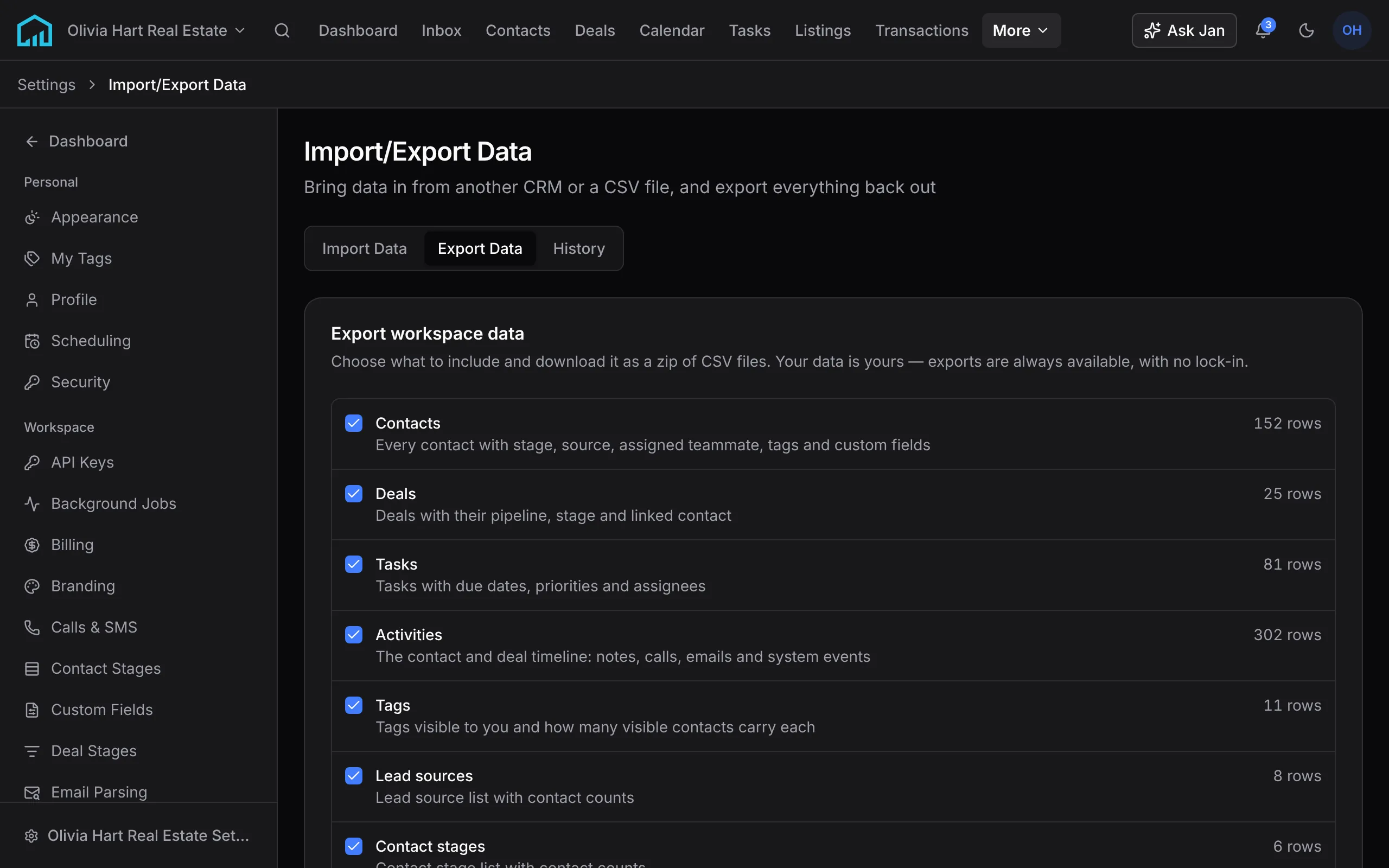
The export in the demo workspace: every dataset with what it holds and how many rows, downloaded together as one ZIP.
The day you leave, this is the whole list.
Five steps, four of them yours. Nothing on it needs a phone call to us, and nothing on it waits for a contract to end.
Export your data
Choose from ten datasets and download them as CSV files in one ZIP. The download link works for an hour.
Settings → Import/Export Data, or ask Jan
Take your phone number
Your new carrier asks for the number and the request shows up in Uplevel. Approve it, or it goes through on its own after about 48 hours.
Settings → Phone & texting → Transfer a number
Keep your domain
A domain you connected stays registered where it is. A domain you bought through Uplevel is yours until its registration ends, and removing it turns auto-renew off.
Websites → Domains
Delete the workspace
It closes for every member at once. You can bring it back for 90 days, then it’s deleted for good. Deleting your only workspace closes your account.
Settings → General
Backups age out
Deleted data can stay in encrypted backups for up to 35 days. After that, it’s gone.
Nothing to do
Ten files, and nothing you can’t open in a spreadsheet.
Pick the datasets you want and download them together. Each file holds what you’re allowed to see, and your roles decide who can export. You can also ask Jan for an export; it makes the same download link once you confirm.
Files attached to contacts and deals aren’t part of the export. Listings from your MLS can’t be exported, because the MLS licenses that data.
- contacts.csv
- Every contact with stage, source, owner, tags and custom field values
- deals.csv
- Deals with their pipeline, stage and contact
- tasks.csv
- Tasks with due dates, priorities and who they’re assigned to
- activities.csv
- The timeline: notes, calls, emails and other activity
- tags.csv
- Your tags and how many contacts carry each
- lead_sources.csv
- Your lead sources, with contact counts
- contact_stages.csv
- Your contact stages, with contact counts
- custom_fields.csv
- The custom fields you defined
- smart_lists.csv
- Smart lists with their filters
- listings.csv
- Listings you created. Not your MLS feed.
Bring your book in. It stays yours, free while Early Access is open.
You run your business on Uplevel now, and whatever you tell us is broken or missing goes straight to the people building it. Applying takes about two minutes.
Free early access- Price
- Free for as long as the program runs
- Card
- None to apply. You add one only to connect MLS
- Included
- 2 phone numbers, 1 domain, 1,000 texts and 500 call minutes a month
- MLS
- Optional. Each market’s data fee at cost, with our $89 platform fee waived
- Afterward
- 50% off your first paid year
You decide how long call records are kept.
One setting covers call transcripts, summaries and voicemail recordings, and one covers Jan conversations. The default keeps them until you delete them.
- Call transcripts, summaries and voicemails
- Kept until you delete them, unless you choose 30, 90 or 180 days, 1 year or 2 years. Anything older is deleted each night. The call log itself stays.
- Jan conversations
- The same choice, counted from their last message.
- Shortening either one
- Asks you to confirm, and emails the workspace owners.
- Deleted data in backups
- Gone within 35 days.

Erase a contact when they ask.
Deleting a contact erases them in one step, the same way from the app, the API or Jan. We keep only what stops them being contacted again and what billing requires.
A buyer can delete their home-search account on your website themselves, or you can delete it for them and keep the contact.
Erased
- The contact
- Their record, notes, activity, tags and household membership
- Texts
- The message text and their number
- Calls
- Transcripts, summaries, voicemails and their number
- Synced, logged and sent email with them, and the threads
- Website
- Their visits, page views, form submissions and home-search account
- Lead emails
- Portal lead emails about them, including the original message
Kept, and why
- Opt-outs
- So they aren’t emailed or texted again if they come back through a form or an import. An email address is kept only as a one-way hash.
- Usage records
- A text or call stays as a row with no content or number, because usage is billed from it.
- Your own records
- Deals, tasks, transactions and appointments stay, without the link to the person.
- Backups
- Encrypted backups expire within 35 days.
Where it lives, and what it’s never used for.
Your workspace is stored in the United States, by Uplevel Technologies, Inc., a Washington company, on servers Akamai (Linode) runs for us.
We don’t sell your data or train models on it. When you use an AI feature, the provider receives only what that request needs to answer it.
Before you bring your book over.
Something else on your mind? Ask us, and a person replies within a business day.
Who owns the data in my Uplevel workspace?
You do. You can export it whenever you like, we don’t sell it, and we don’t use it to train AI models.
Where is my data stored?
In the United States, on servers run for us by Akamai (Linode). Uplevel Technologies, Inc. is a US company based in Washington State. A few providers, such as the one that routes AI requests, are based outside the US, and the sub-processor list names each one.
Does Uplevel train AI on my data?
No. When you use an AI feature, the provider receives the context that request needs to answer it, and nothing is used to train models.
What can I export?
Contacts, deals, tasks, activities, tags, lead sources, contact stages, custom fields, smart lists and the listings you created, as CSV files in one ZIP. Files attached to contacts and deals aren’t part of the export, and MLS listing data can’t be exported.
Can I take my phone number if I leave?
Yes. Ask your new carrier to port it. The request shows up in Uplevel for you to approve, and if nobody answers it goes through on its own after about 48 hours.
What happens when I delete my workspace?
It closes for every member at once. You can bring it back for 90 days, then it’s deleted for good. Deleted data can stay in encrypted backups for up to 35 days after that.
Import your contacts today. Export them again whenever you like.
A CSV or a Follow Up Boss export brings your book in, and the same ten files take it out.
Free while Early Access is open. No card to apply.