Uplevel

An assistant that already knows your clients.

A chatbot can write “a follow-up email.” Jan writes the one to Dana Henderson, because it has read her texts and knows what she’s looking for. Ask it to text a client, draft the newsletter or build an automation. Anything that sends or deletes waits for your OK.

Free while Early Access is open, Jan included. No card to apply.

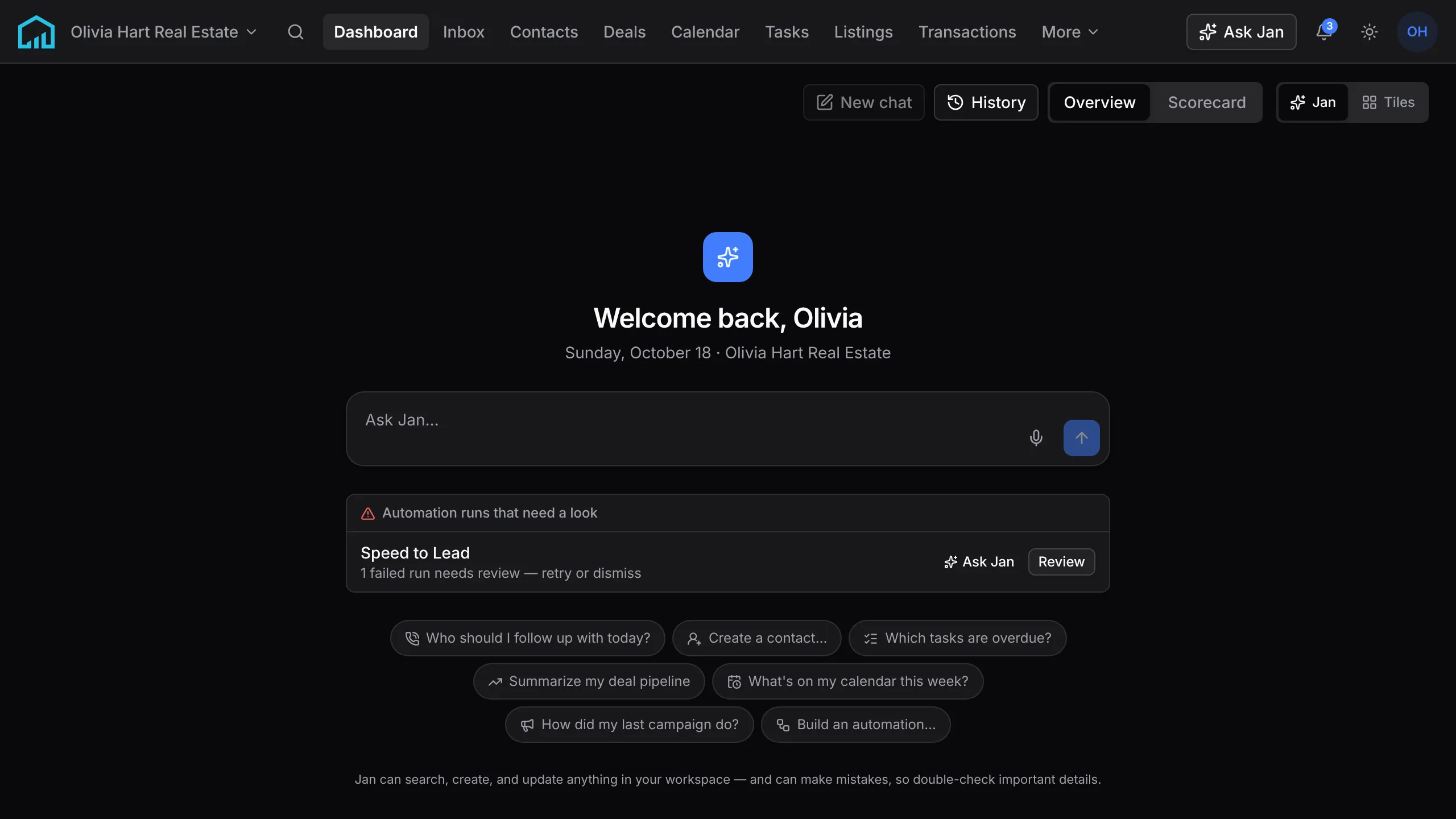
The dashboard opens on Jan: a box to ask it anything, a failed Speed to Lead run flagged with Ask Jan and Review buttons, and three people who asked about 412 Maple St and haven’t been contacted.

The dashboard opens on Jan. The cards under the box are what it noticed before you asked: a run that failed, three people who asked about a listing and haven’t heard back, closings coming up.

Ask for a catch-up before you pick up the phone.

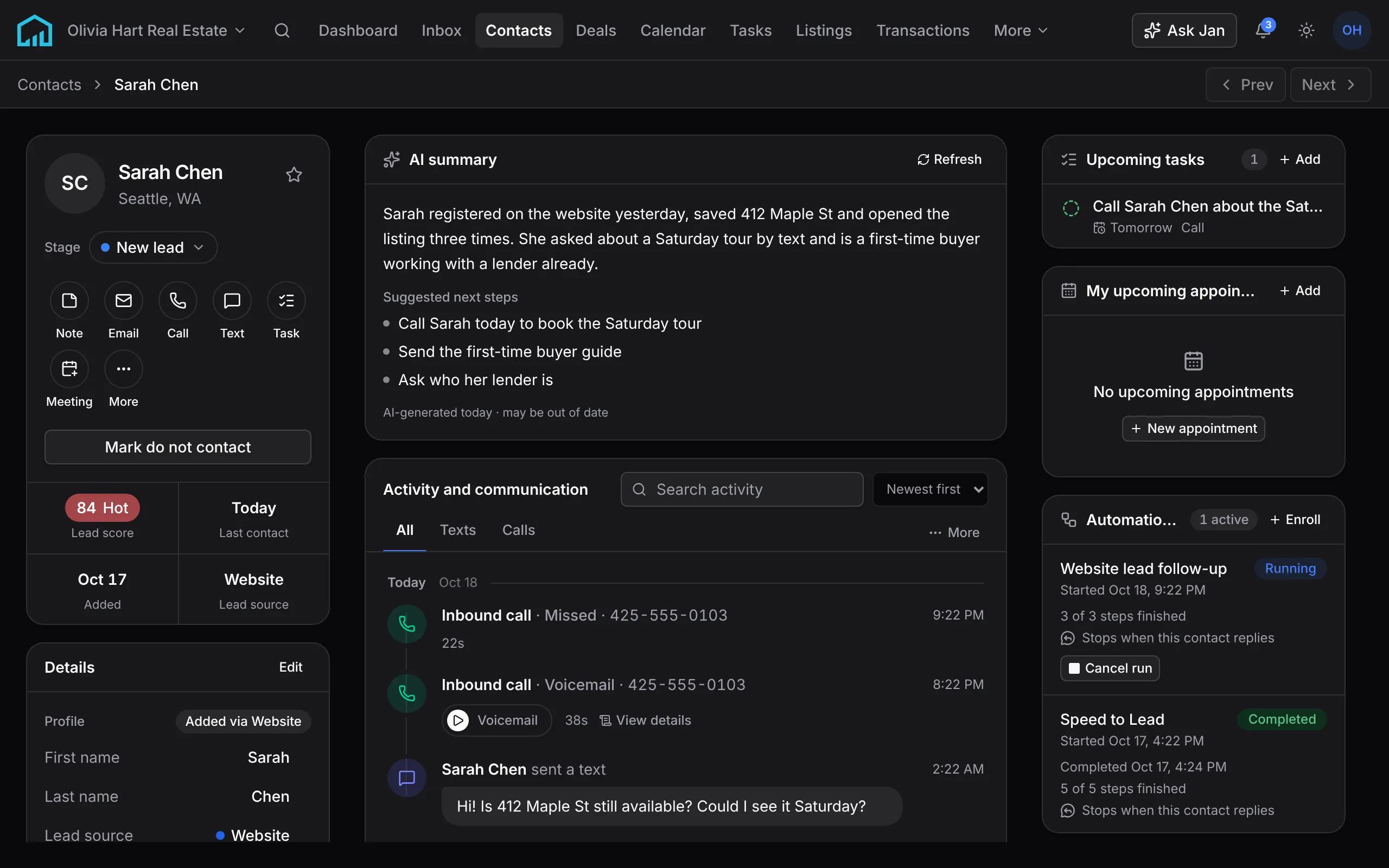
Say “catch me up on Sarah” and Jan reads her texts, the form she filled in on your site, the listings she opened and the notes from your last call, then tells you where things stand and what to do next. The same summary sits on her record for the next time you open it.
What a contact record holds

The summary on Sarah Chen’s record: she registered on the website yesterday, saved 412 Maple St and opened it three times, asked about a Saturday tour by text and already has a lender, with three suggested next steps.
Sarah Chen’s record in the demo workspace.

When an automation fails, ask Jan why.

Jan reads the run, tells you which step failed and why, and retries it from that step once you confirm. Ask it to build the next automation and it comes back checked and saved turned off, ready for you to test on a sample contact.

How automations work

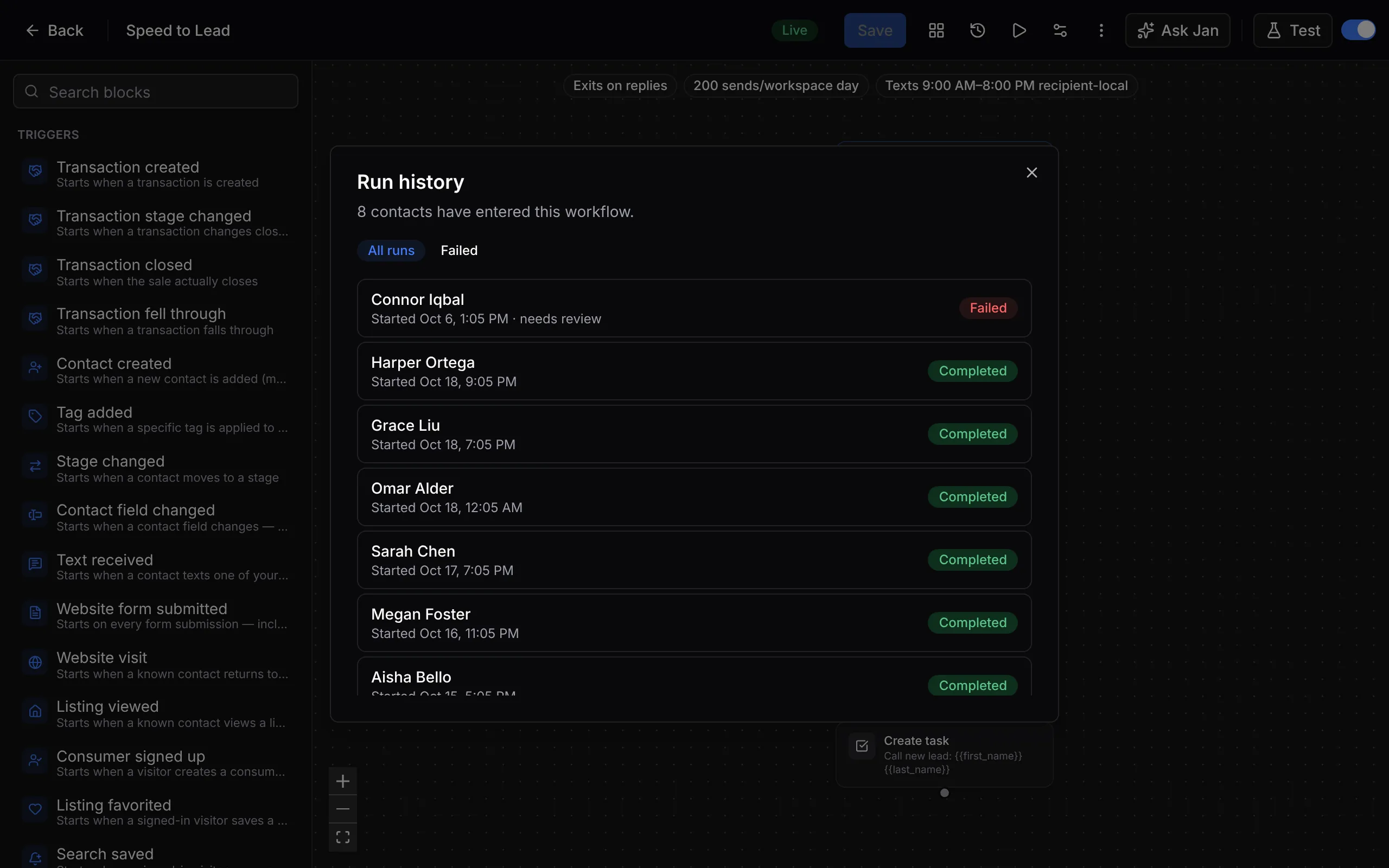
Speed to Lead’s run history: eight contacts have entered, one run for Connor Iqbal failed and needs review, and the rest completed.
Speed to Lead in the demo workspace, with its run history open.

Ten things to ask on day one.

Open Jan from any page, or press ⌘J, and say what you need the way you’d brief an assistant. These ten work in a new workspace with a few contacts in it.

The same ten, step by step
“Who should I follow up with today?”
Ranks the people most worth a call, with the reason for each.
“Catch me up on the Hendersons”
Reads their record, texts, emails and call summaries, and tells you where things stand and what to do next.
“Which buyers have new listings?”
Lists the buyers whose alerts found homes they haven’t been sent yet.
“Text Dana that the inspection moved to Thursday at 10”
Writes the text and shows it on a card with her number and yours. It sends when you confirm.
“Email Marcus the disclosure deadlines”
Writes the email from the account you’d send it from and shows the whole message before it goes.
“Remind me to call Marcus tomorrow at 10”
Creates the task on Marcus’s record, due when you said.
“Draft this month’s newsletter”
Writes it in your brand voice as a draft. You pick the audience and the time on a card before it sends.
“Set up speed-to-lead for website leads”
Builds the automation, checks it and saves it turned off, ready for you to test.
“Build a property website for 4120 Linden Ave”
Builds the page in your brand with the listing’s photos, facts and map, as a draft. Publishing asks first.
“Undo yesterday’s import”
Shows what the import brought in and what undoing it would remove, then removes it when you confirm. Contacts you already had are never touched.

The more it matters, the sooner Jan asks you.

Jan looks things up and drafts on its own. Anything that sends, publishes, turns something on or deletes stops on a card that shows exactly what will happen, and nothing happens until you press Confirm. There is no way to ask it to delete in bulk.

  1. Looks it up and answers

    “What closes in the next two weeks?”

    Nothing to approve. Jan reads what you’re allowed to see and answers.

  2. Builds and drafts

    “Plan a month of market-update posts”

    Nothing goes out. You get a draft to open and change, and a new automation is saved turned off.

  3. Sends, publishes, turns on or deletes one thing

    “Turn on the open house follow-up”

    A card shows exactly what will happen: who it reaches, from which number or address, and the whole message. Nothing happens until you press Confirm, and the card expires after 15 minutes.

    Waits for Confirm

  4. The same request from Claude or ChatGPT

    “Send Dana the new inspection time”

    Sending, publishing, spending and changes to who has access wait for your approval in Uplevel. Each approval runs that one request, once.

    Waits for approval

  5. Deletes in bulk

    “Delete every contact tagged cold”

    Jan has no tool for it. It deletes one record at a time, and each one asks you first.

    Can’t

The card a text waits on: who it goes to, from which number, and the whole message.

It speaks up before you ask.

Your dashboard opens on what needs you, each with a way to act on it. Close a card and it stays closed until something new happens, like another inquiry or a moved closing date. Tell Jan to stop a kind of suggestion, or to bring one back.

The dashboard and its cards
Listing inquiries to follow up
People who asked about one of your listings this week and haven’t heard back. Ask Jan who they are.
Buyers with new matches
Buyers whose listing alerts found homes they haven’t been sent yet. Email them the matches from the card.
Closings in the next two weeks
Each one says whether a closing automation will run for it. If none will, Jan offers the Closing Week & After template.
Automations that failed
Open the failed runs, or ask Jan why they failed and whether to retry.
Brand setup
While your brand is empty, Jan offers to draft it from your website. You review it before anything is saved.

Hand Jan the busywork. Free while Early Access is open.

You run your business on Uplevel now, and whatever you tell us is broken or missing goes straight to the people building it. Applying takes about two minutes.

Free early access
Price
Free for as long as the program runs
Card
None to apply. You add one only to connect MLS
Included
2 phone numbers, 1 domain, 1,000 texts and 500 call minutes a month
MLS
Optional. Each market’s data fee at cost, with our $89 platform fee waived
Afterward
50% off your first paid year

It reads the same records you do.

Jan lives where your clients, conversations and listings do, so it never needs to be told who Dana is or what you sound like.

Your contacts
Each person’s stage, source, what they’re looking for and your notes, their texts, emails and calls with a summary of each call, and their listing alerts.
Deals and listings
Open deals and where they stand, closings coming up, who is interested in each of your listings and how its marketing is doing.
Your day
Your tasks, upcoming appointments and the showing requests waiting for you.
Your brand
Your voice, writing rules and market areas from your brand kit, so what Jan writes sounds like you and carries your license line where it’s required.
Only what you can see
Jan works under your role and permissions in each workspace. If you couldn’t open a contact or a setting yourself, neither can Jan.

Say it instead of typing it.

Between showings, press the microphone and talk for up to a minute. Your words land in the message box so you can check them before you send. The recording isn’t kept.

Use it from Claude or ChatGPT.

Already use Claude, ChatGPT or another AI app? Add Uplevel as a connector and the same work is available there, under your role and permissions, in the workspaces you choose.

When it asks to send, publish, spend or change who has access, Uplevel holds the request and sends back a link. You see every detail and approve it in Uplevel, and only that request runs, once. The AI client can’t approve its own request.

Connect an AI client

For brokerages, Jan works the console too.

In the brokerage console, Jan works for the account rather than one agent’s workspace, and checks what each admin or member is allowed to do.

Each Monday morning, the people who can see performance get Jan’s briefing on the week before: closings and GCI, the top teams, who didn’t sign in, and new leads that waited more than 72 hours for a first touch.

Uplevel for brokerages
Agents
The roster, invitations and invite links, new-agent templates, teams and emailing agents.
Departures
An agent leaving: suspending, signing them out everywhere, and releasing them with their book of business.
Access
Access profiles, who can do what, and approving or declining access requests.
Sign-in
Brokerage email domains, sign-in policy and who still signs in with a password.
Performance
Closings, GCI and agent activity across teams, for anyone allowed to see them.

Jan comes with the plan.

Every workspace includes $5 of AI each month, shared by Jan, dictation and the other AI features in Uplevel. Past that, AI is billed at what it costs plus 50%. Ask Jan how much you’ve used this month.

See pricing

Questions about Jan

Something else on your mind? Ask us, and a person replies within a business day.

What can Jan do?

Most of what you can do in Uplevel. Jan looks up and updates contacts, deals and tasks, texts and emails clients, drafts broadcasts, builds property websites, landing pages and automations, finds out why an automation failed, and changes many settings. When it can’t do something, it says so.

Will Jan send something without asking me?

Not from a conversation. Texts, emails, broadcasts, publishing and turning an automation on all wait for you to press Confirm, and a card you leave alone expires after 15 minutes. An automation you’ve turned on runs by itself from then on. Its AI message steps hold their drafts for your approval unless you set a step to send automatically.

What happens to an automation Jan builds?

It’s saved turned off, with the checks already run, so you can open it, change it and test it on a sample contact. Turning it on is a card you confirm, and so is turning it off again.

Can Jan see everything in my workspace?

Only what you could open yourself. Jan works under your role and permissions, and your conversations with Jan are yours.

Can I use Jan from Claude or ChatGPT?

Yes. Add Uplevel as a connector and the same work is available there, under your permissions. Sending, publishing, spending and changing who has access wait for your approval in Uplevel, and the AI client can’t approve its own request.

Can I talk to Jan instead of typing?

Yes. Press the microphone and speak for up to a minute. The words land in the message box for you to check before you send, and the recording isn’t kept.

How much does Jan cost?

Jan is part of the plan. Every workspace includes $5 of AI each month, shared by Jan and the other AI features in Uplevel. Past that, AI is billed at what it costs plus 50%. During Early Access it’s free, and AI stops at the $5 until the next month starts.

Give Jan your first errand.

Start with “who should I follow up with today?” and see what it comes back with.

Free while Early Access is open. No card to apply.