Uplevel

Know who to answer first.

Each client’s Gmail, texts, missed calls and voicemail sit in one conversation, next to their record. If they wrote last, the list says how long they’ve waited, until someone answers.

Free while Early Access is open. No card to apply.

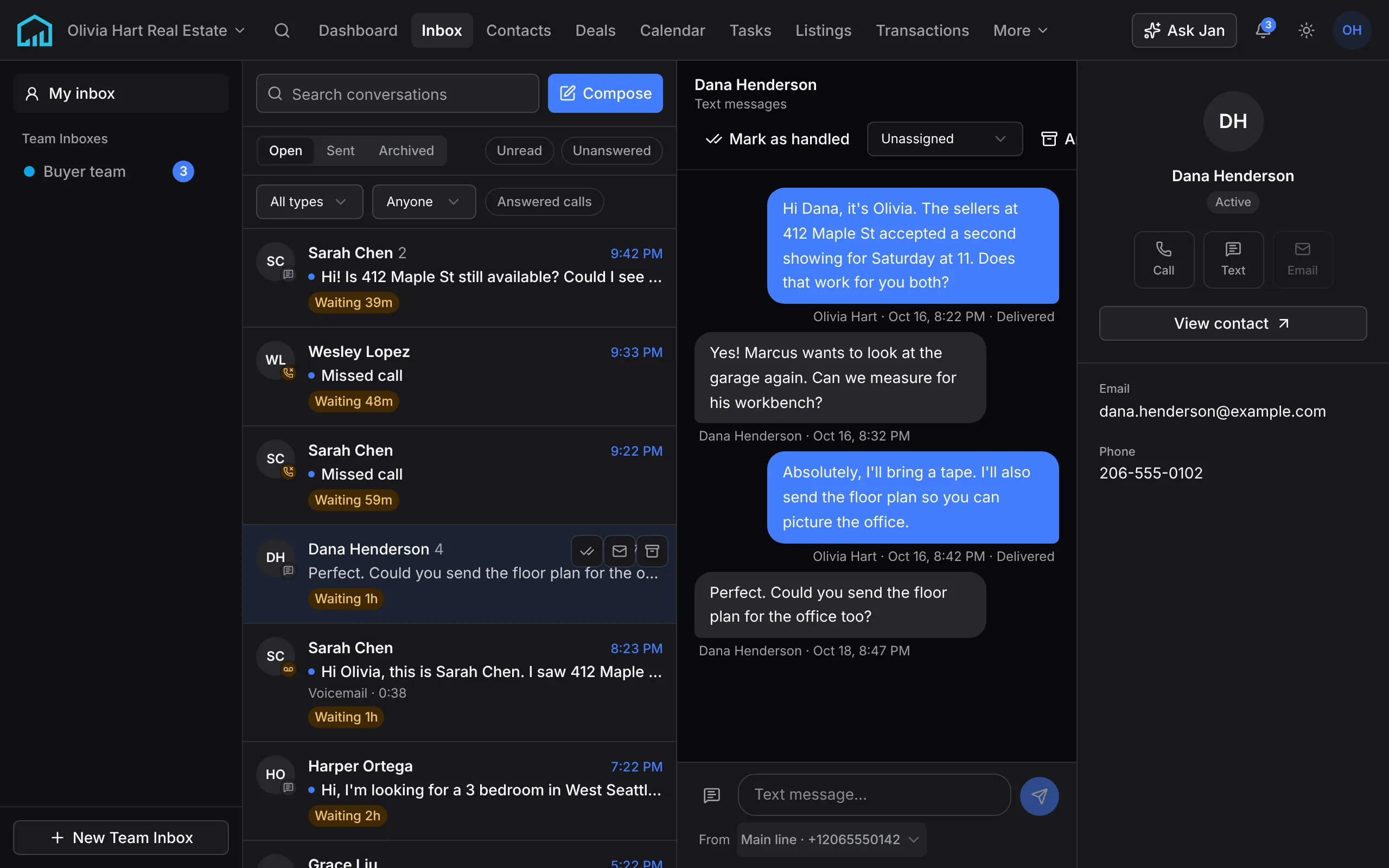
A text thread with Dana Henderson on a phone, sent from the business number, with each text marked delivered.

See who’s been waiting, and for how long.

Every conversation where the client spoke last carries its wait, in the list, next to their name. Turn on Unanswered and that’s the whole list: no newsletters, no auto-replies, no “thanks, see you then”.

Reply, or mark it handled, and it drops off. Work from the top and the person who has waited longest is always the next one you open.

The top of the conversation list: Open, Sent and Archived, the Unread and Unanswered filters, and two conversations marked Waiting 39m and Waiting 48m.
The list, from the demo workspace, with the waits as it shows them.
  1. Voicemail

    “Hi, it’s Sam. Is the Ballard house still available?”

    Waiting 14h

    You call back, text or email them. The transcript is the preview, and the message plays in place.

  2. Missed call

    A new number, (206) 555‑0148

    Waiting 9h

    Someone calls back, texts or emails. A new number becomes a contact, so the lead isn’t lost.

  3. Email

    Re: Saturday showing

    Waiting 3h

    You reply, or mark it handled when it doesn’t need an answer.

  4. Text

    “Did the sellers counter?”

    Waiting 40m

    You reply, or mark it handled.

  5. A closing reply

    “Perfect, thanks. See you then!”

    No wait

    A “thanks, see you then” leaves you nothing to send. When Uplevel can’t tell, the conversation keeps waiting.

  6. Machine mail

    Newsletters, auto-replies, no-reply senders

    Never waits

    Mailing lists, auto-replies, no-reply addresses, Gmail tabs other than Primary and texts from short codes are set aside.

Share one number, and see who has each lead.

A Team Inbox gives a team, the people you choose or a lead pond one number for calls and texts, and a shared email address if you want one. New messages land unassigned. Anyone can pick one up, and the whole team sees who has it.

Calls to the number ring whoever you choose, the same way as any Uplevel line.

How teams run on Uplevel
The Buyer team's Team Inbox on its shared number: a missed call and two texts nobody has taken yet, each marked with how long it has waited, and Harper Ortega's text open with a menu to assign it and a Close button.
Unassigned
New calls, texts and emails land here, and the inbox’s people are told. Anyone can reply, assign it or claim it.
Assigned
Each conversation shows who has it. New messages notify that person instead of everyone, and the rest can still read along.
Closed
Close a conversation when it’s handled. A new message from them reopens it.

See who’s waiting on you. Free during Early Access.

You run your business on Uplevel now, and whatever you tell us is broken or missing goes straight to the people building it. Applying takes about two minutes.

Free early access
Price
Free for as long as the program runs
Card
None to apply. You add one only to connect MLS
Included
2 phone numbers, 1 domain, 1,000 texts and 500 call minutes a month
MLS
Optional. Each market’s data fee at cost, with our $89 platform fee waived
Afterward
50% off your first paid year

Your Gmail, connected both ways.

Connect your Google accounts and the inbox fills in with the last 90 days of mail between you and your contacts. From then on it checks for new mail about every three minutes. How to connect Gmail

Replies send through Gmail, so they land in the client’s thread and in your Sent folder.

More than one account
Connect a work address and a personal one. Filter the list by account, and replies go out from the account the client last heard from unless you choose another.
Only your clients’ mail
Uplevel keeps mail exchanged with people in your contacts. Bills, newsletters and personal mail stay in Gmail, and you can name addresses or domains it must never keep.
Archive and read, both ways
Archive a thread or mark it read in Uplevel and Gmail changes to match.
Someone new writes in
Click Add as contact and Uplevel fills in their name, phone, title and company from their signature. Email a new address and they become a contact too, so their reply is kept.

Email is Gmail, including Google Workspace addresses. Outlook mail doesn’t connect yet.

Ask Jan what’s waiting, or have it write the reply.

Jan reads the thread and the contact before it writes, in the voice you set. Every email and text it drafts waits on a card for you to send. More about Jan

“What’s waiting on me?”
Jan lists the conversations waiting on a reply, oldest first.
“Email Jane that the inspection is booked for Thursday.”
Jan writes it in your brand voice and shows you the whole email, who it goes to and the account it sends from. Nothing sends until you confirm.
“Find the email where the lender sent the pre-approval.”
Jan searches your mail and reads you the thread.
“Mark Jane’s thread as handled.”
Jan clears it from waiting. A new message from Jane puts it back.

Before you connect.

Something else on your mind? Ask us, and a person replies within a business day.

What counts as answered?

An email or text stops waiting when you reply, or when you mark it handled. A missed call or voicemail stops waiting once anyone calls back, texts or emails that person, whether from the inbox, their contact page or an automation. Answered calls move to the contact’s timeline with a summary, and you can show them in the list whenever you want.

Does the inbox work with Outlook or Microsoft 365 mail?

Not yet. Email in Uplevel is Gmail, including Google Workspace addresses.

Can I connect more than one Gmail account?

Yes. Connect as many Google accounts as you use, turn on Mail for each, and filter the inbox by account. Replies go out from the account the client last heard from unless you choose another.

How quickly does new email show up?

Uplevel checks each connected account about every three minutes. When you first connect, it reads back 90 days of mail with your contacts.

Does Uplevel keep all of my email?

No. It keeps only mail exchanged with people in your contacts, and skips any address or domain you add to your never-log list. Everything else stays in Gmail.

Can my teammates read my synced email?

Not unless you share it, and an admin can’t change that for you. While it’s private, teammates who share a contact see only that you talked. Email you send from Uplevel stays visible to them.

Who gets told when a text or call comes in?

New texts, missed calls and voicemails notify everyone who can see the conversation, or only the person it’s assigned to. Each person chooses whether they get those notices.

Do I need a phone number?

For email, no: Gmail is enough. Texts, missed calls and voicemail come through an Uplevel number, either a new local number or the one you have now.

What is a Team Inbox?

A shared inbox for a team, chosen people or a lead pond. It has its own number for calls and texts and, if you want one, a shared email address: forward an address on your own domain to it, or connect a shared Google mailbox. Its people claim conversations, see who has each one and close them when they’re handled.

I’m coming from another CRM. Do my old conversations come over?

Bring your contacts over first. Connecting Gmail afterward reads back your last 90 days of mail with them, so the conversations are there when you open the inbox.

Get back to everyone who’s waiting.

Connect Gmail and see whose message still needs an answer today.